
Last updated on
Oct 31, 2026
DD 2982 2015-2026 free printable template
We are not affiliated with any brand or entity on this form

Fill out
Complete the form online in a simple drag-and-drop editor.

eSign
Add your legally binding signature or send the form for signing.

Share
Share the form via a link, letting anyone fill it out from any device.

Export
Download, print, email, or move the form to your cloud storage.
Why pdfFiller is the best tool for your documents and forms


End-to-end document management
From editing and signing to collaboration and tracking, pdfFiller has everything you need to get your documents done quickly and efficiently.
Accessible from anywhere
pdfFiller is fully cloud-based. This means you can edit, sign, and share documents from anywhere using your computer, smartphone, or tablet.
Secure and compliant
pdfFiller lets you securely manage documents following global laws like ESIGN, CCPA, and GDPR. It's also HIPAA and SOC 2 compliant.
What is DD 2982
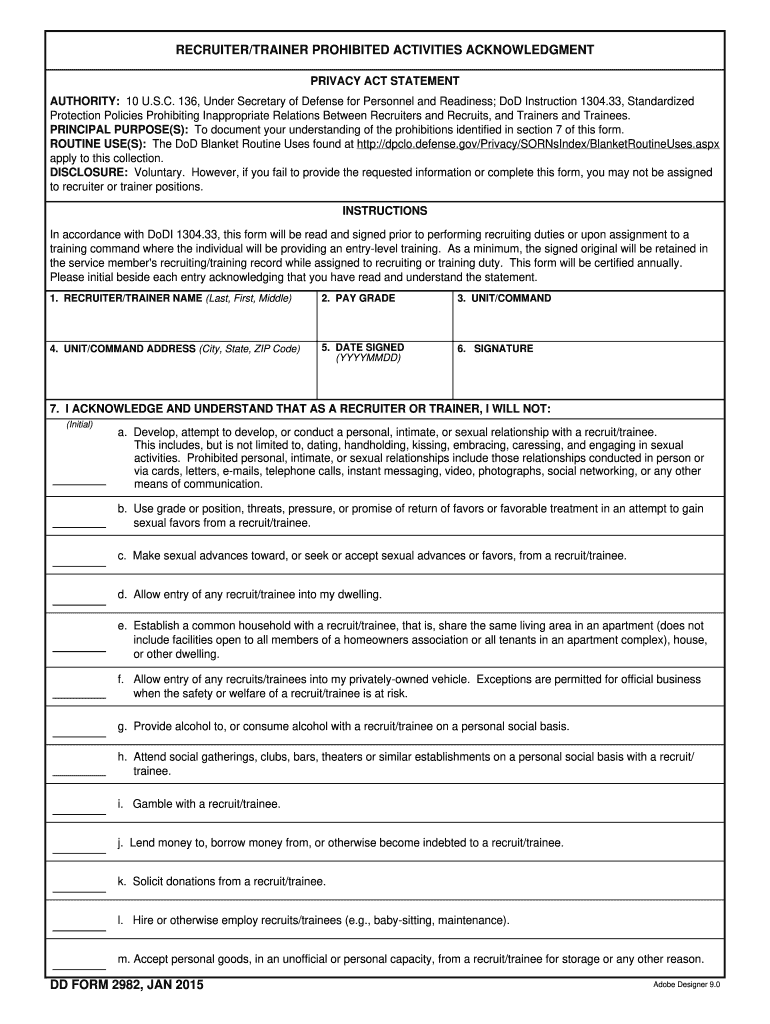
The DD Form 2982 Prohibited Activities Acknowledgment is a legal document used by military recruiters and trainers to acknowledge understanding of prohibited activities pertaining to their roles.
pdfFiller scores top ratings on review platforms




Who needs DD 2982?
Explore how professionals across industries use pdfFiller.

DD 2982 is needed by:
-
Military recruiters responsible for onboarding new personnel
-
Trainers guiding recruits through mandatory training processes
-
Commanders overseeing recruitment and training efforts
-
Human resources personnel in military settings
-
Legal advisers associated with military protocols
Comprehensive Guide to DD 2982
What is the DD Form 2982 Prohibited Activities Acknowledgment?
The DD Form 2982 serves as a critical document within the U.S. Department of Defense, designed to formally acknowledge prohibited activities by recruiters and trainers. Its primary purpose is to ensure compliance with military regulations by clearly outlining what actions are deemed unacceptable during the recruitment and training processes. This acknowledgment helps establish a transparent environment essential for maintaining ethical standards and safeguarding the interests of both military personnel and recruits.
Purpose and Benefits of the DD Form 2982 Prohibited Activities Acknowledgment
The necessity of the DD Form 2982 lies in its role in promoting transparency and compliance within military recruitment and training. By documenting prohibited activities, this form aids in protecting not only the integrity of the recruitment process but also the reputation of the personnel involved. It fosters a culture of accountability among recruiters and trainers, ensuring that all parties understand their responsibilities.
Additionally, this acknowledgment serves to enhance the trust relationship between recruiters, trainers, and the potential recruits, thereby improving the overall effectiveness of the military training programs.
Who Needs to Complete the DD Form 2982?
Completion of the DD Form 2982 is required by specific roles within the military. This includes:
-
Recruiters, who engage in the direct recruitment of new military personnel.
-
Trainers, who provide the essential training and guidance to recruits.
-
Commanders, who oversee recruitment and training operations.
The signatures of these individuals validate the acknowledgment, cementing their commitment to adhere to military standards regarding prohibited activities.
Key Features of the DD Form 2982 Prohibited Activities Acknowledgment
The DD Form 2982 includes several essential fields that must be completed, such as:
-
'RECRUITER/TRAINER NAME'
-
'PAY GRADE'
-
'UNIT/COMMAND'
-
'DATE SIGNED'
-
'SIGNATURE'
Annual certification is required to maintain the accuracy and relevance of the information documented on the form. Proper handling of data is also emphasized to ensure compliance with military protocols.
How to Fill Out the DD Form 2982 Prohibited Activities Acknowledgment Online
Filling out the DD Form 2982 online using pdfFiller is a straightforward process. Follow these steps:
-
Access the form on the pdfFiller platform.
-
Fill in your personal information, ensuring accuracy in each field.
-
Review and initial beside each entry, confirming your details.
-
Sign the form electronically, using the eSigning feature for convenience.
Online form completion offers advantages such as ease of use and enhanced security measures, safeguarding your personal information throughout the process.
Common Errors and How to Avoid Them When Filling Out the DD Form 2982
While filling out the DD Form 2982, users may encounter several common mistakes, including:
-
Incorrect entries of personal information.
-
Failure to provide required initials or signatures.
To avoid these issues, double-check all entries before submission, and utilize pdfFiller's verification tools that can help ensure accuracy and completeness of the form.
Submission Methods for the DD Form 2982 Prohibited Activities Acknowledgment
Once the DD Form 2982 is completed, it can be submitted through various methods including:
-
Online submission via pdfFiller.
-
Mailing the printed form to the appropriate authority.
Awareness of submission deadlines is crucial to ensure timely processing, avoiding any delays in compliance.
Security and Compliance When Handling the DD Form 2982
It is vital to secure sensitive personal information in accordance with regulations such as HIPAA and GDPR. PdfFiller employs robust security measures including 256-bit encryption and adherence to SOC 2 Type II guidelines to protect user data during the filling and submission processes. By using pdfFiller, users can rest assured that their submissions are handled with the utmost care and security.
What Happens After You Submit the DD Form 2982?
After submission, users can expect a confirmation of receipt along with tracking options to monitor the status of their acknowledgment. Should there be a need to correct or amend the form, clear guidelines will be provided by the relevant military authority, ensuring that the process remains efficient and transparent.
Empower Your Form Filling Experience with pdfFiller
Maximize your experience with the DD Form 2982 by leveraging the comprehensive features of pdfFiller, including editing, eSigning, and efficient document management. The user-friendly interface simplifies the management of military forms, ensuring a secure and seamless workflow throughout the form filling process.
How to fill out the DD 2982
-
1.To begin, access the DD Form 2982 on pdfFiller by navigating to the search bar and entering 'DD Form 2982 Prohibited Activities Acknowledgment'.
-
2.Open the form by clicking on the title once it appears in your search results.
-
3.Gather necessary information, including your name, pay grade, unit/command, and the date you will be signing.
-
4.Start by filling out your personal information in the designated fields, ensuring accuracy while entering your name and pay grade.
-
5.Next, locate the field for your unit or command and input the full name of your military unit as per official records.
-
6.Find the date signed field and enter the date you are completing the form, formatted as MM/DD/YYYY.
-
7.Once all information is correctly filled in, review each entry to ensure no mistakes are present and confirm that initials are noted where required.
-
8.Proceed to sign the document in the designated signature field, using a touchpad or mouse for accurate representation.
-
9.After completing all fields and ensuring the form is accurate, click the 'Save' icon to store a copy of your filled form.
-
10.To submit the form, either download it for manual submission or use pdfFiller's submission options if available.

Who is required to sign the DD Form 2982?
The DD Form 2982 must be signed by military recruiters and trainers, as well as their commanders. This ensures that all parties acknowledge the understanding of prohibited activities.
Is there a deadline for submitting this form?
While the DD Form 2982 does not specify a set deadline, it must be certified annually. It’s best to complete and submit it as soon as you begin your recruitment or training duties.
How should I submit the completed DD Form 2982?
After filling out the form, you can submit it by downloading it for manual submission to your administrative office or using any specific submission procedures provided by your unit.
What supporting documents are required with this form?
No specific supporting documents are mentioned for the DD Form 2982. However, having personal identification details and military assignment information ready will facilitate accurate completion.
What are common mistakes to avoid when filling this form?
Ensure to fill in all required fields completely and check for accuracy. Common mistakes include missing initials, incorrect dates, or illegible handwriting in the signature area.
How long does it take to process the DD Form 2982?
Processing times for the DD Form 2982 can vary based on organizational procedures. Generally, it is evaluated shortly after submission as part of annual training compliance.
Can this form be filled out online?
Yes, the DD Form 2982 can be filled online using pdfFiller, which simplifies the process by allowing users to complete and submit forms electronically.
Related Content
Related Forms



Related Catalogs
Get the latest insights from our blog


If you believe that this page should be taken down, please follow our DMCA take down process
here
.
This form may include fields for payment information. Data entered in these fields is not covered by PCI DSS compliance.